Backports
We only offer support for the last two mayor version.
For instance, if we are on the version 0.32.0.dev, we make backports for v0.31.x and v0.30.x. We only backport fixes and not features, as we want to respect Semantic Versioning.
The idea of a backport is to bring a given fix from the last development version to an older release.
The process for making backports is the following:
-
Reproduce the error against develop.
-
Develop a fix for the issue, starting from the develop.
-
Open the Pull Request, adding the following labels:
type: fix,release: 0.xx, in our example using0.32.0.dev, we would attachtype: fix,release: v0.31. -
If the fix affects multiple versions, attach the corresponding release tag (for instance,
release: v0.30). -
Be patient and wait for a maintainer to review and merge.
-
Once it is merged, an automated workflow will attempt to apply the patch.
-
If you have an already merged Pull Request, you can add another
release: v0.xxtag, and this will retrigger the backport workflow. You do not need to decide when you open the PR which are the versions you want to backport to.
Maintainers only
In order to ease up the backport process, you will need to install the decidim-maintainers_toolbox gem.
gem install decidim-maintainers_toolboxThis will provide you with some commands that you can use for day to day activities:
Before starting to use decidim-maintainers_toolbox gem, you will need to make sure that you have available the gh command, provided by GitHub. Follow the gh project’s page for installation steps that are most suited for your Operating System.
decidim-backports-checker
The decidim-backports-checker is an utility that you can use to investigate which are the Pull Requests that needs to be backported.
Usage:
  decidim-backports-checker --github-token=GITHUB_TOKEN --last-version-number=LAST_VERSION_NUMBER

Options:
--github-token=GITHUB_TOKEN                # Required. Github Personal Access Token (PAT). It can be obtained from https://github.com/settings/tokens/new. You will need to create one with `public_repo` access.
Alternatively, you can use the `gh` CLI tool to authenticate with `gh auth token` (i.e. --github-token=$(gh auth token))
--last-version-number=LAST_VERSION_NUMBER  # Required. The version number of the last supported version that you want to do the backports to. It must have the format MAJOR.MINOR.
[--days-to-check-from=N]                   # How many days since the pull requests were merged we will check from.
# Default: 90

Backports checker. Shows the status of the pull requests opened in the last days

The output by default is for the terminal. It uses a color code to differentiate the status of the Pull Requests, following the colors of GitHub:
- Purple: closed with a merge
- Red: closed without being merge
- Green: opened without being merge
Any maintainer that wants to see the pending Pull Requests that needs to be backported to a specific version, should type in the following command:
decidim-backports-checker --github-token=$(gh auth token) --last-version-number=0.31In our previous example, we have the develop branch set to be on 0.32.0.dev, which means that our latest released minor version is 0.31. We are using the minor version regardless if we are at 0.31.0.rc2, 0.31.0 or 0.31.1.
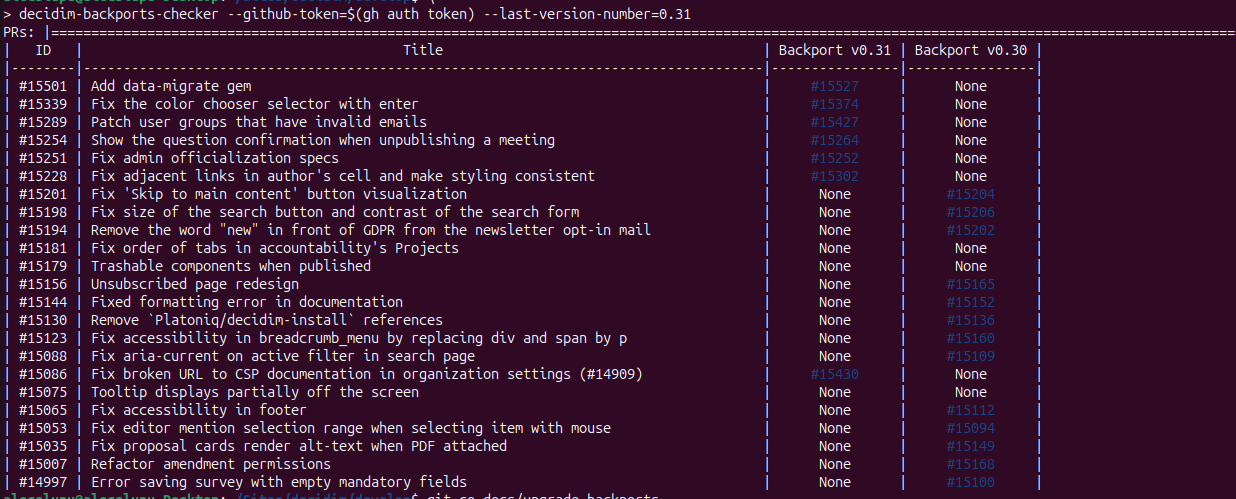
In the above picture:
-
15501is a Pull Request that has been only opened for0.31, with no active backport to0.30. -
15201is a Pull Request that has only been backported to0.30 -
15181is a Pull Request that has not been backported, or the automated backport script failed -
We do not displayed a merged backport Pull Request.
If you want to address a PR only for a specific version, you open the Pull Request for that version, then you can add no-backport label for the Pull Request that you do not want to backport to the oldest version.
If a Pull Request is fully backported (merged backport Pull Requests in 0.31 and 0.30 versions), then the line will not be displayed.
decidim-backporter
As previously mentioned, we have an automated tool that will try to add create the backports automatically, but sometimes, due to conflicts the automated backport is not possible, so you need to use the decidim-backporter command.
Usage:
  decidim-backporter --github-token=GITHUB_TOKEN --pull-request-id=PULL_REQUEST_ID --version-number=VERSION_NUMBER

Options:
  --github-token=GITHUB_TOKEN                                                                             # Required. Github Personal Access Token (PAT). It can be obtained from https://github.com/settings/tokens/new. You will need to create one with `public_repo` access.
Alternatively, you can use the `gh` CLI tool to authenticate with `gh auth token` (i.e. --github-token=$(gh auth token))
  --version-number=VERSION_NUMBER                                                                         # Required. The version number that you want to do the backport to. It must have the format MAJOR.MINOR.
  --pull-request-id=PULL_REQUEST_ID                                                                       # Required. The ID of the pull request that you want to make the backport from. It should have the "type: fix" label.
  [--exit-with-unstaged-changes], [--no-exit-with-unstaged-changes], [--skip-exit-with-unstaged-changes]  # Optional. Whether the script should exit with an error if there are unstaged changes in the current project.
                                                                                                          # Default: true
  [--with-console], [--no-with-console], [--skip-with-console]                                            # Optional. Disables the shell dropout
                                                                                                          # Default: true

Backport a pull request to another branch
An example of the command is:
decidim-backporter --github-token=$(gh auth token) --pull-request-id=1234 --version-number=0.31In this particular example, 1234 is the Pull Request merged against develop branch, while --version-number is the version where we want to backport.
We do not need to pass the full version, as this will apply the fix only for the unreleased versions, regardless if we are on 0.31.0.rc1, 0.31.0 or 0.31.1
The command will attempt to apply the patch, and if the patch fails with error, a console will be displayed, allowing you to change the files in your editor. After the conflict is fixed, you will need to write the following in your console:
git add <any conflicting files that you fixed>
git cherry-pick --continue
# type logout or press CTRL + D
The process will continue creating the backport Pull Request.
If you want to skip the backport creation for any reason, you just need to ensure that when your console drops, you do not have staged / modified files. Typing a git cherry-pick --abort will clean the backport process. After that you just need to exit the console with either logout or CTRL+D.